OCR scanned PDFs in seconds — locally, with a clean desktop UI.
Drag and drop a PDF, click Start OCR, then copy the extracted text to your clipboard. Built with PySide6 (Qt6), powered by Apple Vision on macOS and Tesseract OCR on Windows/Linux.
Drop a PDF, click Start OCR, copy the text. The whole flow, one loop.
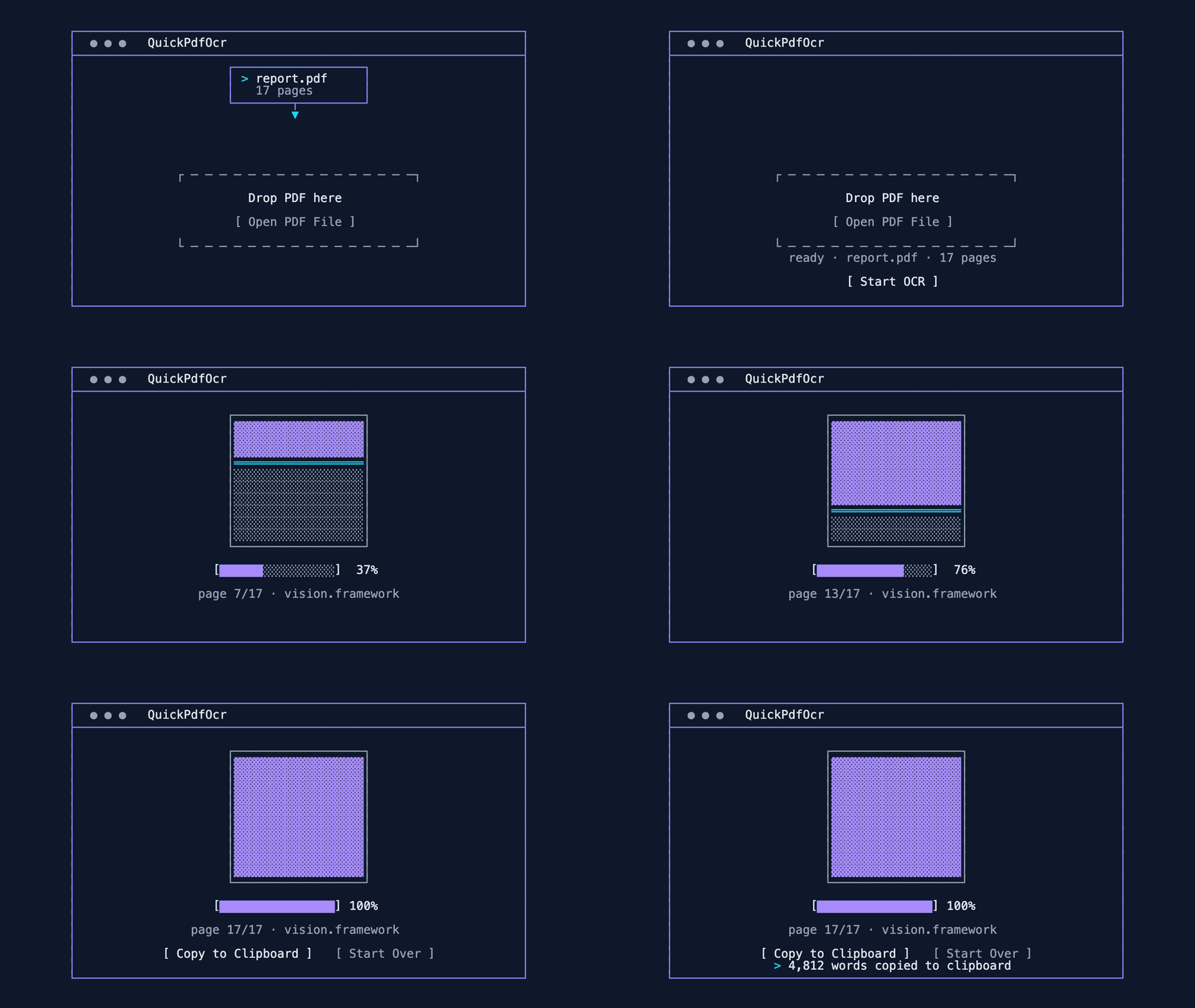
QuickPdfOcr is a lightweight PDF OCR application that helps you extract text from image-based or scanned PDFs using Apple Vision on macOS and Tesseract on Windows/Linux. It's designed to be straightforward: choose a PDF (or drag it in), run OCR, and copy the text.
Simply drag and drop PDF files directly into the application window for instant processing.
Browse and select PDFs using the traditional file picker if you prefer.
Apple's Vision framework (built into macOS) and industry-standard Tesseract on Windows/Linux extract text accurately from scanned pages.
Real-time feedback shows processing status while OCR is running.
Instantly copy extracted text to your clipboard on macOS, Linux, and Windows.
Retry or start over options available if something fails during processing.
Clean, user-friendly interface with clear visual feedback throughout the process.
Pre-built executables bundle Python and PDF rendering (pypdfium2 — no Poppler, ever) on every platform. On macOS, OCR uses the Vision framework built into the OS, so there's nothing else to install. Windows/Linux need Tesseract installed separately.
Your documents stay on your computer. QuickPdfOcr runs locally and performs OCR on-device. No uploads, no cloud processing, no data collection. Your privacy is guaranteed.
Recommended: Download the pre-built executable for your OS from GitHub Releases. The app is intended to be "download and run." No installation required!
All executables bundle Python, PySide6, and PDF rendering (pypdfium2 — no Poppler, on any platform). macOS uses OCR from the Vision framework provided by the system — nothing else to install. Windows and Linux use Tesseract OCR, which is not bundled and must be installed separately.
Run from source (Python) or build your own standalone binary. The project uses PySide6, pypdfium2 for PDF rendering on every platform, Apple's Vision framework for OCR on macOS, and pytesseract + Pillow for OCR on Windows/Linux.
# Clone the repository

git clone https://github.com/KSEGIT/QuickPdfOcr.git

cd QuickPdfOcr


# Install dependencies

pip install -r requirements.txt


# Run the application

python main.py


# Build your own executable

python build.py
